Restore Corrupted .bak File in SQL Server
Bak file recovery software repairs backup file from corrupted state. It recovers and previews all database objects like Tables, Views, Stored Procedure etc. software can easily repair corrupted .bak file without any file size limitation. SQL backup repair tool is compatible with SQL Server version 2019, 2017, 2016, 2014 and its below versions.
Options to Export Selected Items from .bak
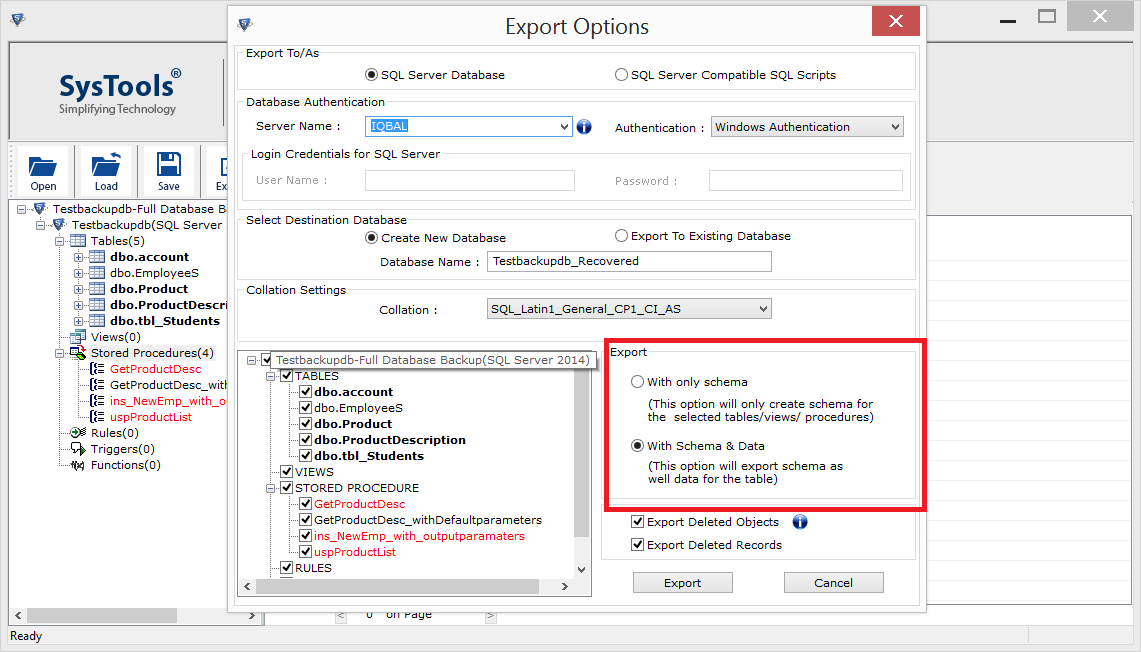
SQL Server bak file repair tool provides you an option to export selected .bak file items. The tool performs batch exporting of data from SQL backup file. SQL backup repair provides you two options to export the SQL data items. Either export as 'With Schema Only' option, which exports only the schema of the database objects or as 'With Schema or Data' option, which exports schema as well as data.
: ExtPrint3r recreates the behavior of the "LTMEAT Print" method by flooding a webpage with hidden iframes and then attempting to print that page.
Used a "hanging" technique to freeze the browser and disable extensions.
It is sometimes mentioned alongside activities intended to find specific types of users or data on social platforms. Risks and Security Concerns
While the technical challenge of using an exploit is enticing, it carries significant risks. In community forums, experts often warn that tampering with property that does not belong to the user can lead to school disciplinary action, fines, or even expulsion. Furthermore, "unrolling" a device often removes the security patches and monitoring protocols designed to protect the user from malware and external threats. Conclusion extprint3r
Return to the ExtPrint3r interface and follow the prompts to input your target URL/ID.
A 3D model (STL file) doesn't go straight to the printer. It needs to be "Sliced" into layers. Popular slicers include Cura, PrusaSlicer, and BambuStudio.
keyword "extprint3r" appears obscure. I need to determine what it refers to. I'll search for it. search results show that "extprint3r" is a security exploit related to ChromeOS extensions. To fully understand it, I need to gather more details. I should open the relevant GitHub repository, the CVE page, and other analysis sites. I'll open a variety of results to get a comprehensive view. information gathered so far indicates that "extprint3r" is a ChromeOS extension exploit, part of a family of similar tools, and has been assigned CVE-2025-6179. The response will be a long-form article. It will cover the nature of the exploit, its technical details, impact, and mitigation strategies. I'll structure the article with an introduction, sections on technical details, its place within ChromeOS exploit history, the CVE, impact, defense mechanisms, and a conclusion. I'll cite the sources as needed. Now, I'll write the article. digital world was put on high alert in mid-2025 with the disclosure of , a critical vulnerability that laid bare a severe security flaw in Google's ChromeOS, the operating system powering millions of Chromebooks worldwide. Central to this security event was a tool known as ExtPrint3r . This name might sound like a piece of printing software, but it's actually a sophisticated exploit designed to bypass the core security model of ChromeOS. : ExtPrint3r recreates the behavior of the "LTMEAT
While these tools are often viewed by students as a way to gain freedom on restricted devices, they pose significant risks:
The exploit targets a specific behavior in how browsers handle nested frames during a print request: Iframe Flooding : The tool creates a high volume of within a page. Print Triggering : It then initiates a print command for that page. Process Hanging
The tool exploits a critical vulnerability in how ChromeOS (specifically versions around ) manages extension permissions and processes. Risks and Security Concerns While the technical challenge
Here’s how to configure it properly:
The disclosure of CVE-2025-6179 triggered a rapid response from Google. The primary and most effective defense is simple: . Google released a patch that addresses the underlying permission flaw, and any ChromeOS device running a version beyond 16181.27.0 is immune to this specific attack.
ExtPrint3r is a browser-based exploit designed for that allows users to disable or "freeze" managed extensions by overwhelming the browser's printing and rendering processes. It was developed as a more consistent and long-lasting successor to previous methods like Core Mechanism
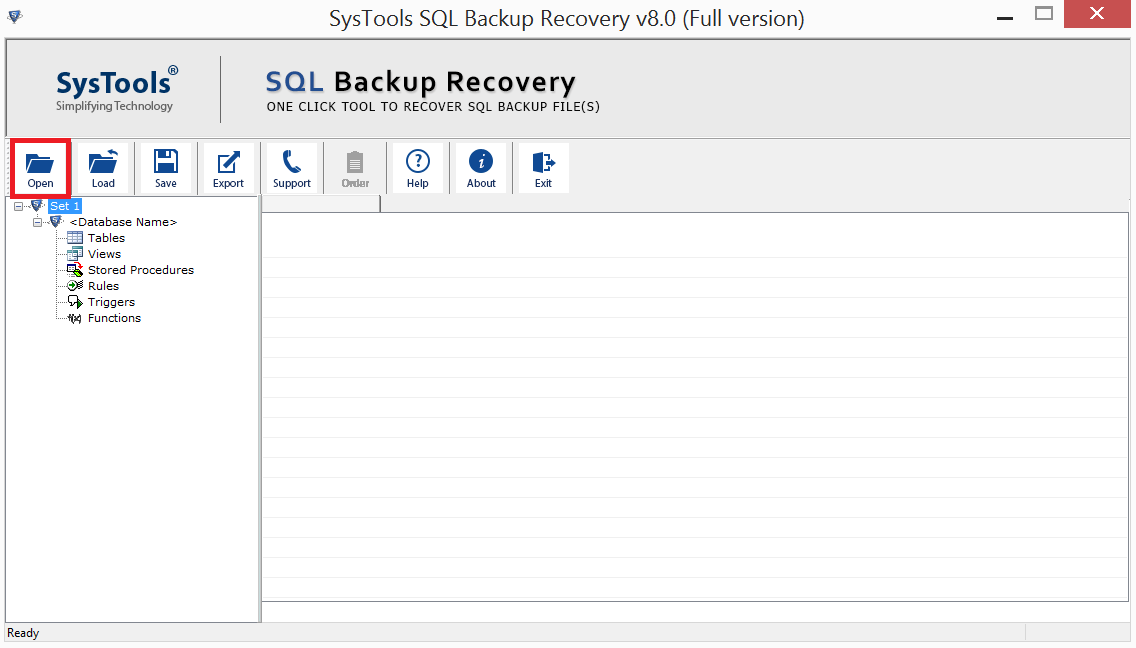
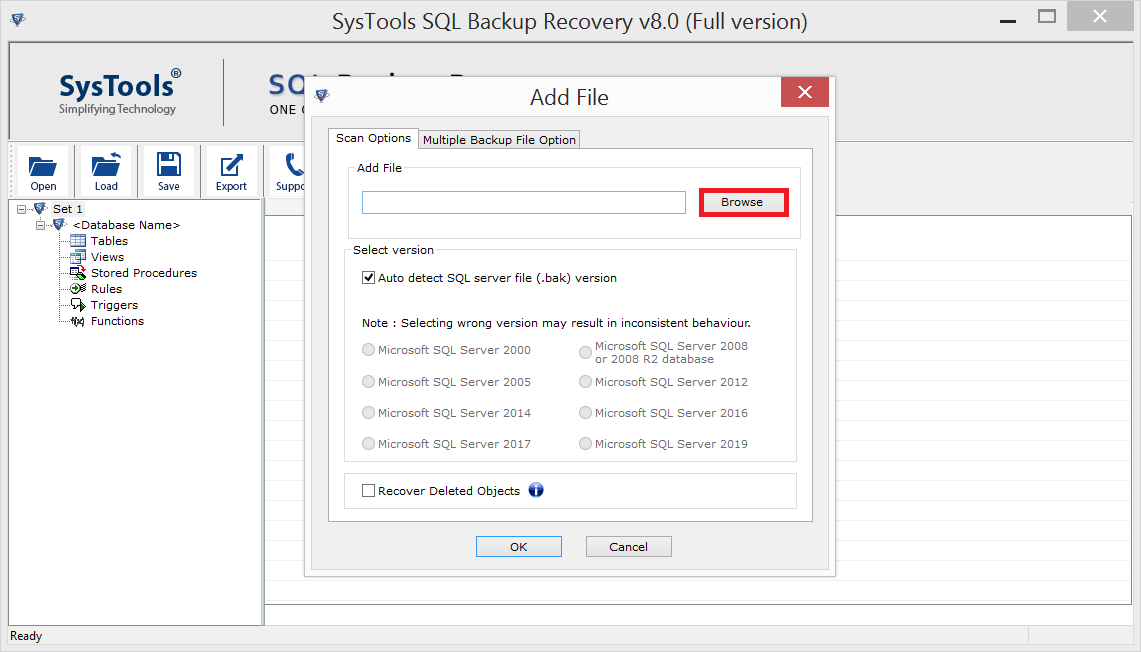
Install and Launch SQL Backup Repair Tool.

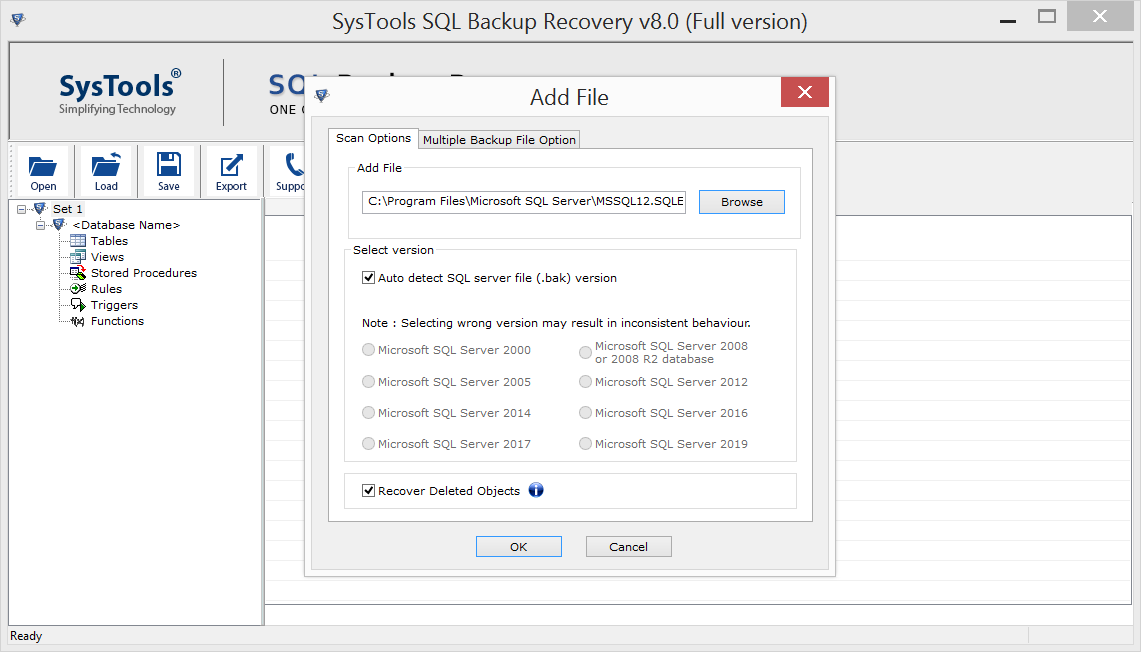
Go to Browse Button and browse SQL BAK Files. Click "Open".

The software gives you option to "Auto-Detect" the version of SQL .bak file. Or you can manually select the version of .bak file.

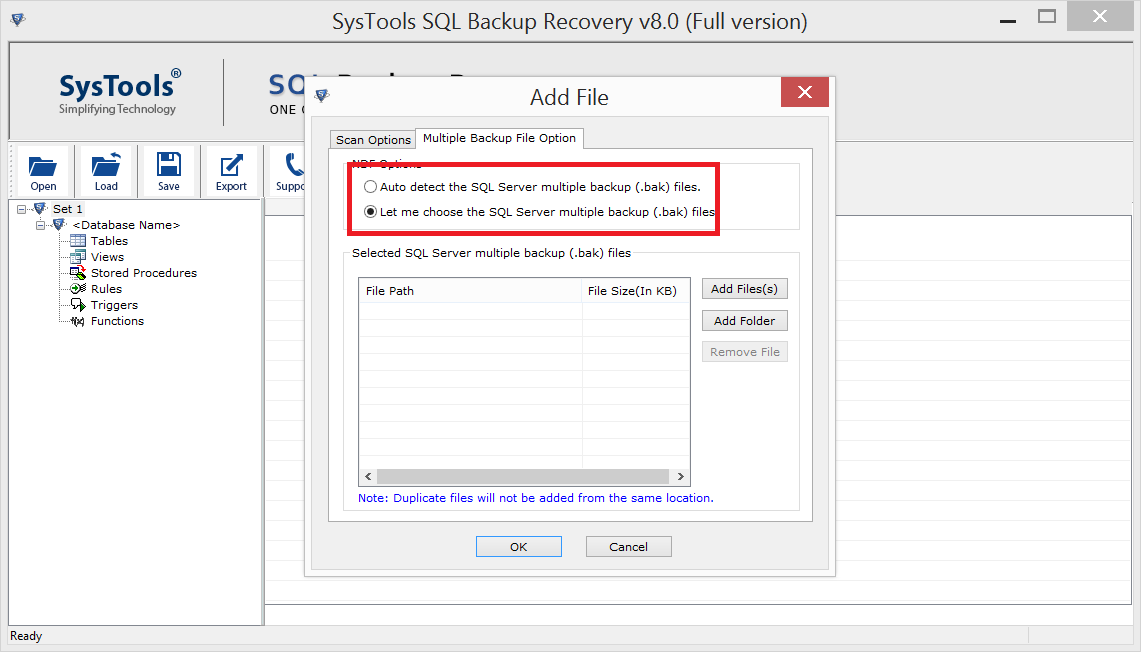
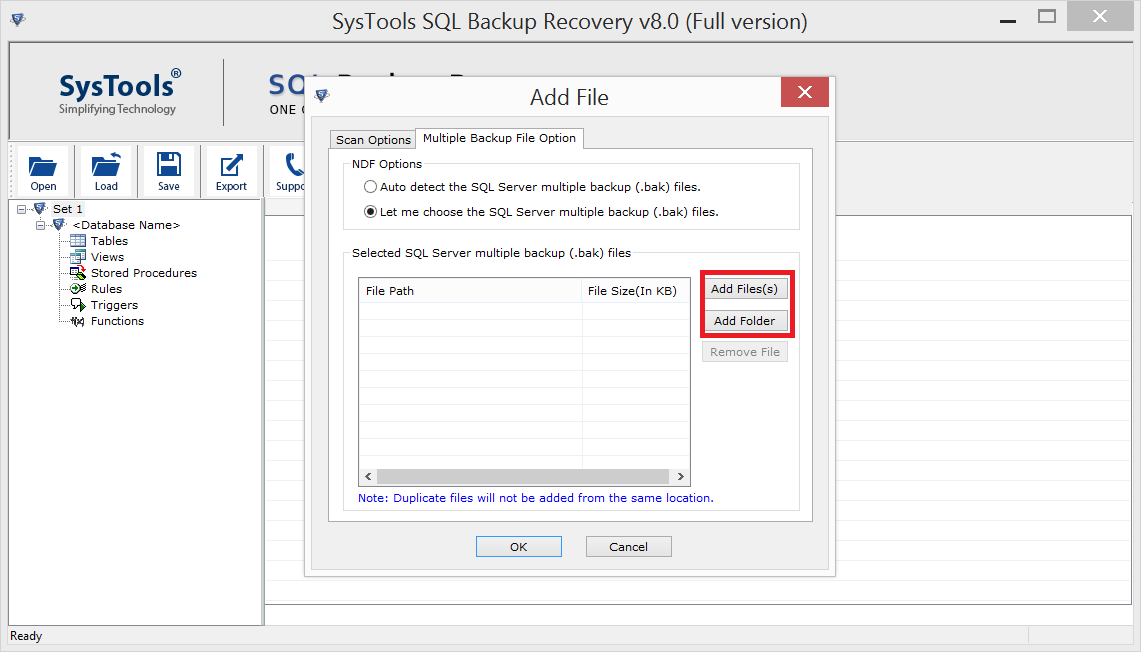
SQL Backup Repair tool gives you two different options to select .bak file. Either choose it manually by clicking on Add File or Add Folder option or Choose Auto-Detect if you dont know where your .bak file is stored.

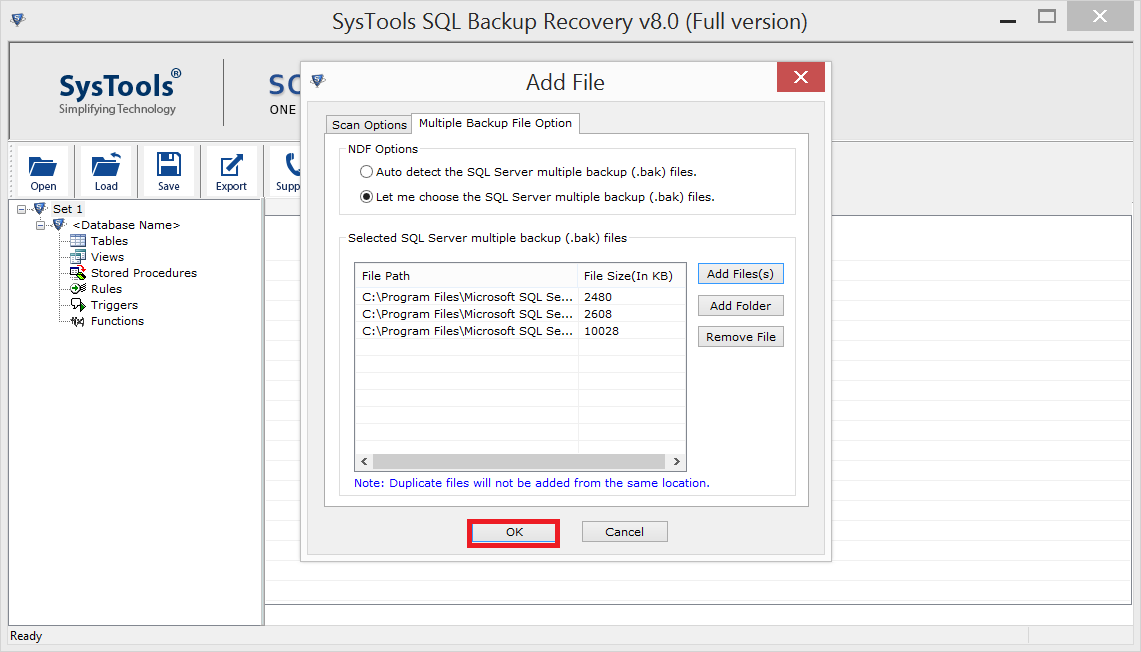
Click Add File to select single .bak file or Add Folder to choose multiple .bak file.

After selecting the file. Click "Ok"

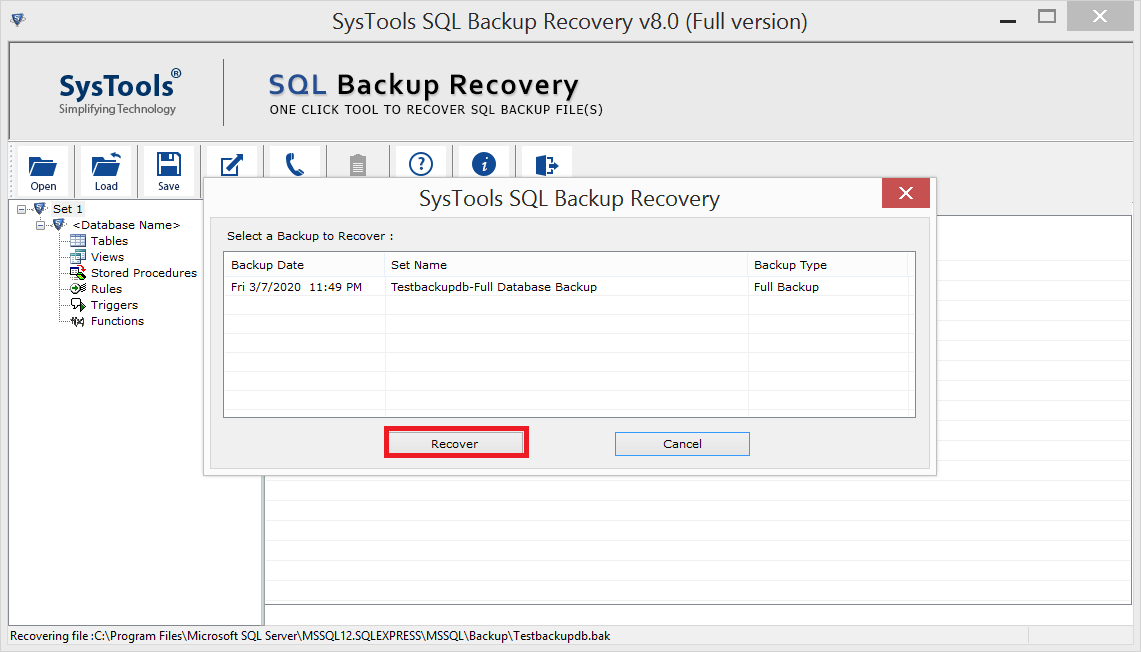
Select the backup file & Click Recover.

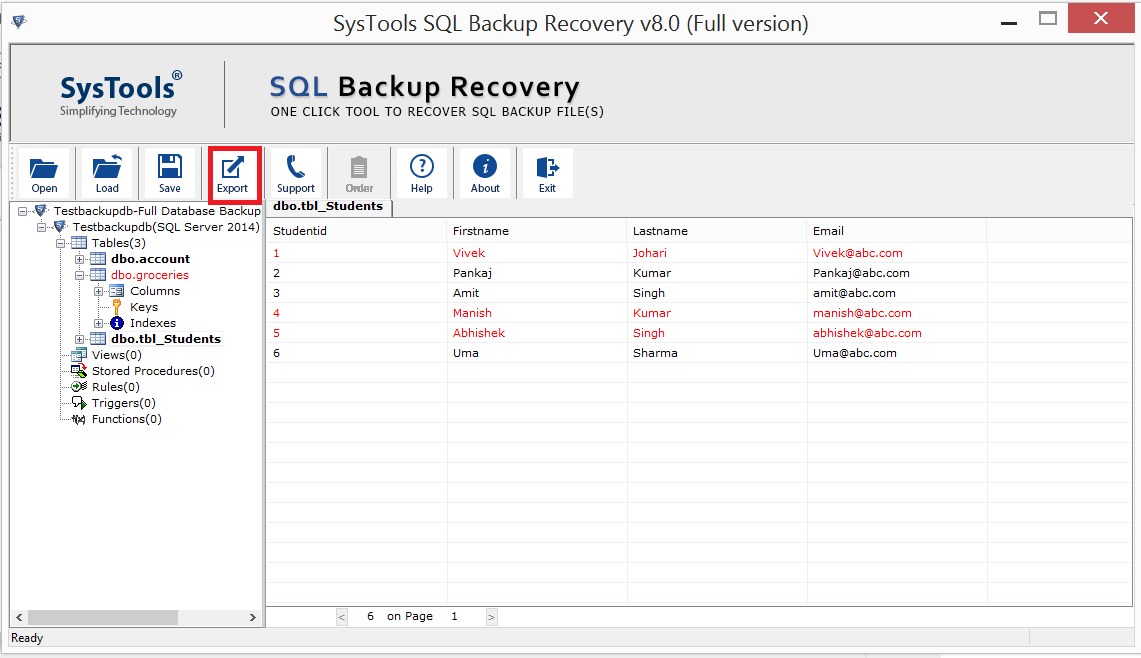
SQL Backup recovery software preview all recovered data items and display the complete preview of recovered elements. Click Export to save recovered items in SQL Server Database.

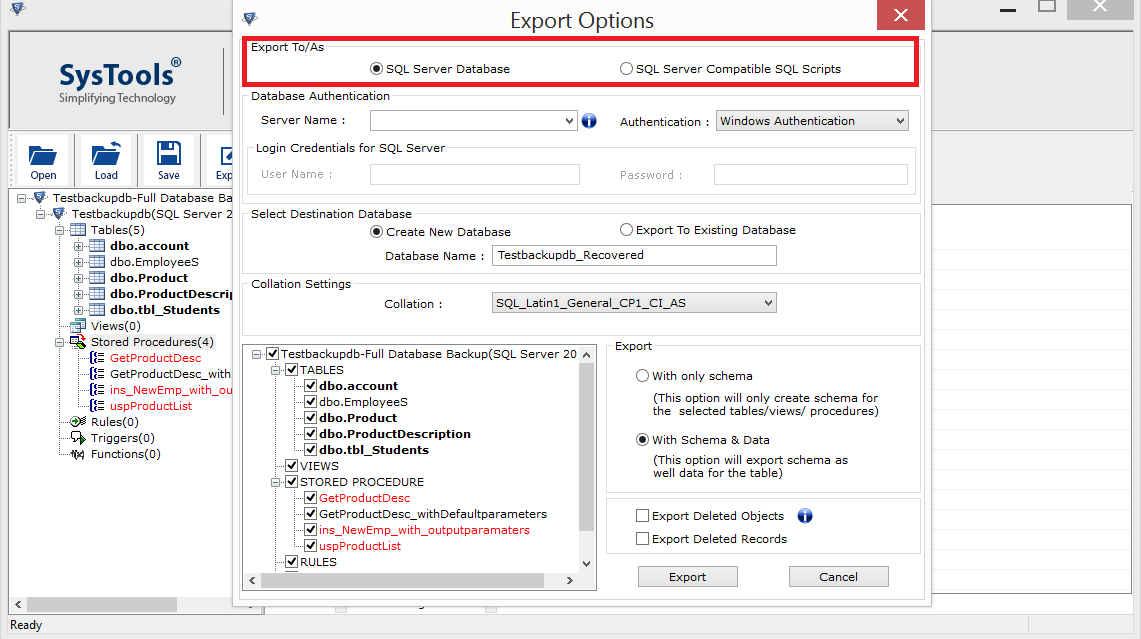
You will get two option to save recovered data, SQL Server Database or as SQL Server Compatible Script. Your data will export directly to SQL Server, if you choose SQL Server Database or Export to local system by choosing SQL Server Compatible script option.

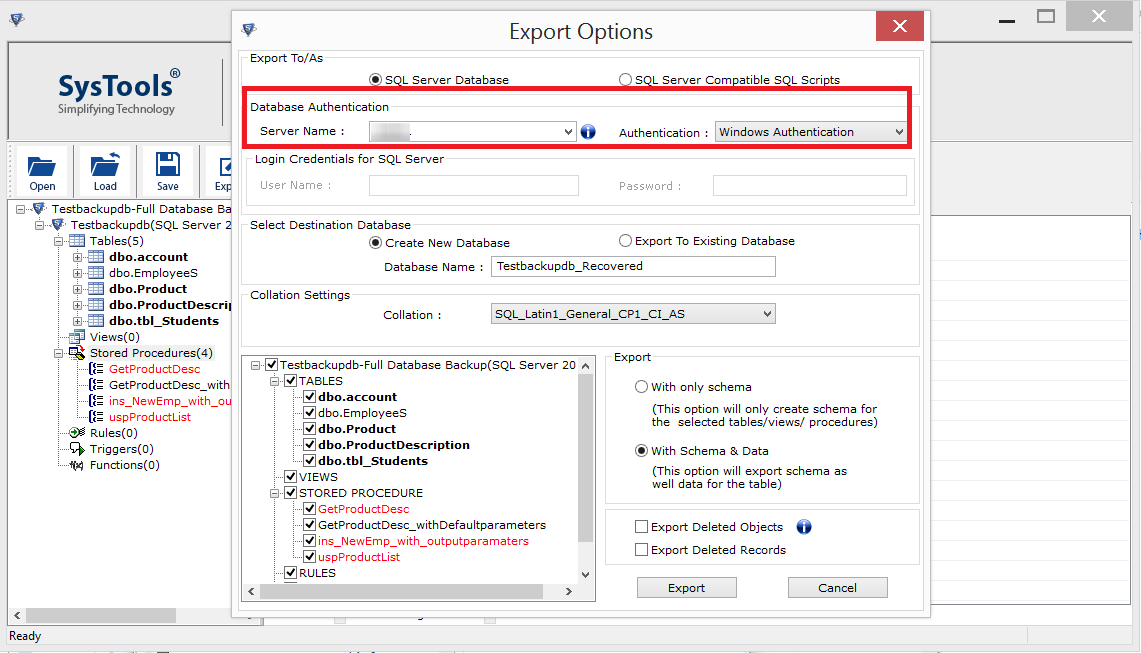
If you choose to save as SQL Server Database, you will need to fill the credentials of SQL Server Database.

Backup Repair Tool provides you an option to export selected recovered data items. Choose 'With Schema', if you want to export only the schema of the database objects or 'With Schema & Data', if you want to export Schema as well as Data of recovered database objects.

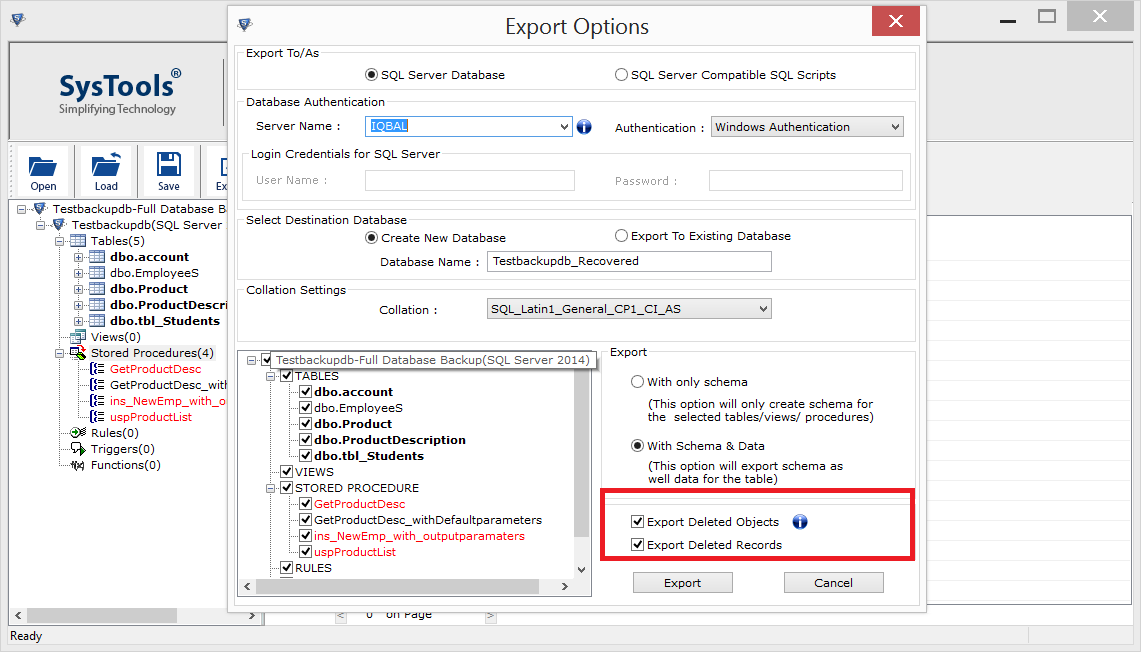
Check the Export deleted records or export deleted objects option.

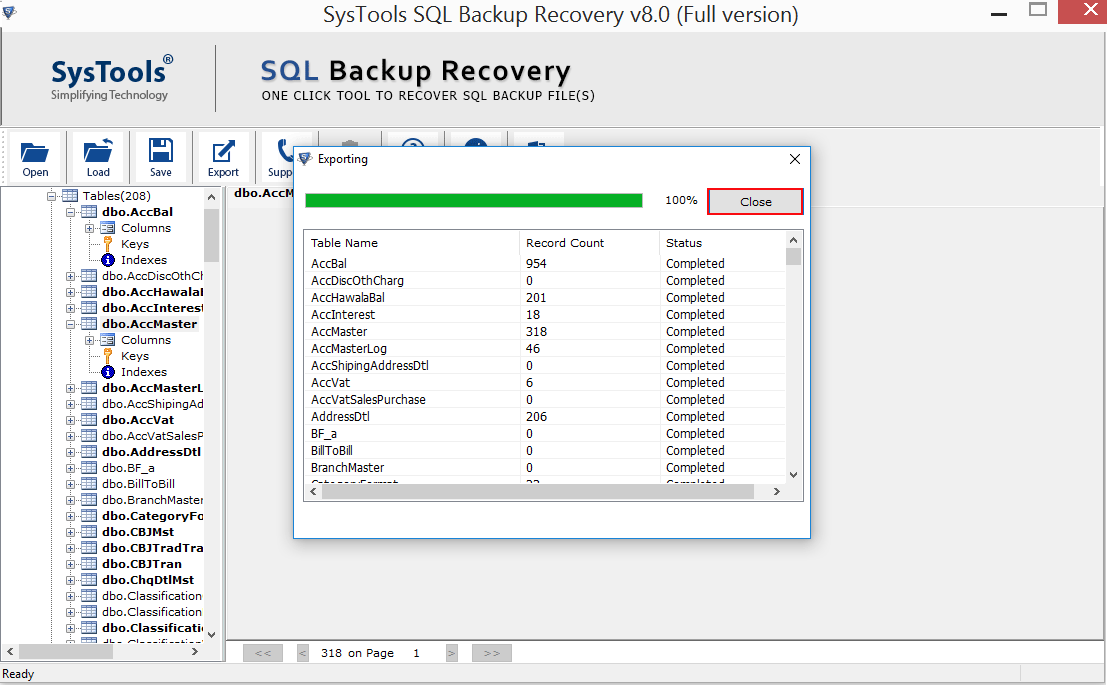
'Export completed' pop up will appear showing your corrupted .bak file has been restored successfully.
Product FAQs
Download SQL backup repair tool trial variant for quick recovery of sql .bak file.
Demo version of SQL backup recovery tool export only 25 records of each table & 5 other categories.
System Specifications:
Restore Corrupt SQL Backup Under Such Circumstances
Mark Kendall, USA
28/11/2017
My SQL Server continuously showing me an internal consistency error "RESTORE DATABASE is terminating abnormally", When tried to restore SQL Server database from backup file. After running the 'RESTORE VERIFYONLY' command, it shows me the backup is corrupted. I have heard about some applications that can generate SQL scripts from the .bak file, but they are very costly. Lastly, I found SQL Server .bak file repair tool that restore corrupted bak file without any data loss. Cheers to the developers for creating such utility.
Avira Smith, USA
12/02/2018
I was searching for the solution to repair corrupt SQL .bak file and after searching alot, I found this SQL backup recovery software helpful in restoring SQL Server database from backup file. I would suggest this as best SQL backup recovery tool to fix corrupt .bak file.
Steve Charles, London
13/10/2016
SQL backup repair utility becomes saviour to our organization. We were getting SQL Server error 3013, tried manual approach, but thinking that our data might get lost by doing this, scares us. So we stumbledupon this SQL Server backup repair tool , and it successfully repaired corrupted SQL Backup file. This is useful utility to fix SQL backup file in affordable price. Cheers!